Dispatch board
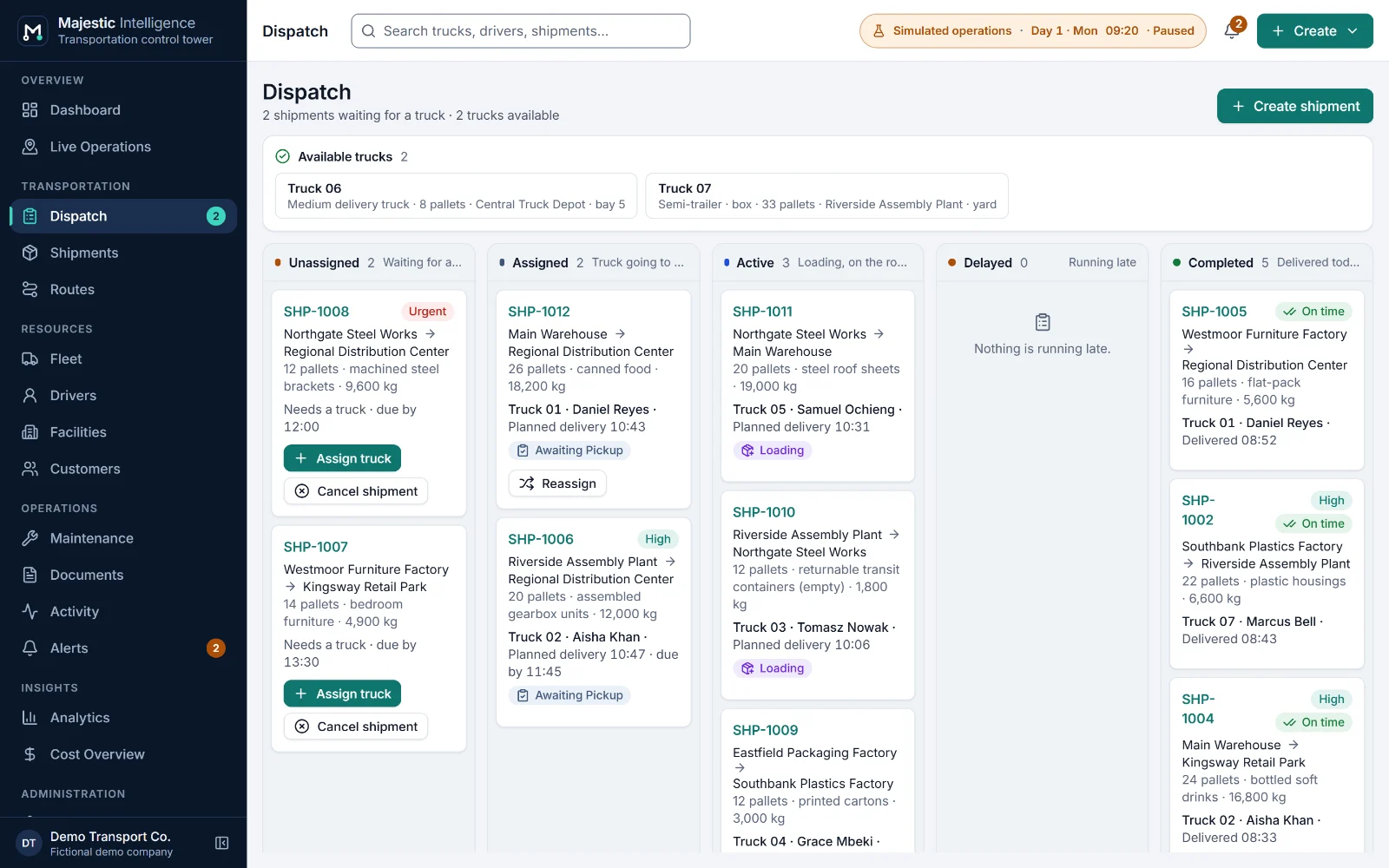
Shipments in columns by stage, with the trucks available now. Delayed work has its own column, each delay with a cause: traffic, late departure, waiting for a dock or late at the pickup.
Plan and run
Dispatch is where shipments meet trucks and drivers. The board sorts every shipment by where it stands: Unassigned, Assigned, Active, Delayed and Completed. When a shipment needs a truck, Majestic Intelligence ranks the fleet and tells you why each truck is or is not a fit.
The problem
Dispatching from memory works until the fleet grows or the dispatcher is away. Then a flatbed gets offered for boxed goods, a driver is given work that runs past the end of the shift, or a truck booked for the workshop is sent out.
The value
Every assignment is checked by the same rules, whether a person or the planned dispatch makes it. Suggestions read like a colleague's advice ("At the pickup by 10:42 · Meets the deadline · 10 of 14 pallets · 5 h of shift left"), so the dispatcher stays in charge and new staff learn the reasoning.
What it does
Each of these is on a screen of the working demo. Open it to try it on the simulated operation.
Shipments in columns by stage, with the trucks available now. Delayed work has its own column, each delay with a cause: traffic, late departure, waiting for a dock or late at the pickup.
Best match first: suitable truck, earliest at the pickup, meets the deadline, smallest that fits, most shift left. Trucks that cannot take the work are listed with the reason.
The scenario's daily bookings are given to the best free truck by the same explainable rules a few minutes after they arrive, between 05:50 and 20:00; shipments you create wait for you. No machine learning and no scores; it can be switched off in Settings.
A truck must be in service, have a body that suits the goods and the capacity for them; the driver must hold the right licence class and have a shift that covers the job, all the way back to the depot.
Create a shipment or a transport job from the header. Reassign or cancel while the truck is assigned, or once it has reached the pickup and before loading starts, but not while it is driving there. The truck becomes available where it stands.
Send a free truck home as an empty run, or let trucks left without work away from home return by themselves after 45 minutes.
Benefits
More features
A dashboard of what needs a decision, and every truck and facility on a satellite map or a 3D view of the operation.
Every shipment with its timeline, priority and deadline, and its bill of lading and proof of delivery tracked to the end.
Trucks, drivers and shifts, and maintenance work orders that dispatch respects.
See it working
Open the working product: trucks loading, on the road and unloading across California’s Inland Empire. No sign-up; nothing connects to real systems.
Built by METHODSS
METHODSS adapts Majestic Intelligence to your fleet, sites and rules and connects it to your data, or designs and builds new logistics software with you.