Features
Logistics software features for the whole transport day.
Majestic Intelligence covers the work of a trucking operation from the network to the numbers: a control tower on a real map, dispatch, shipments and their paperwork, the fleet and its maintenance, routes on real roads, and analytics. Every feature below is in the working demo.
See
Control tower
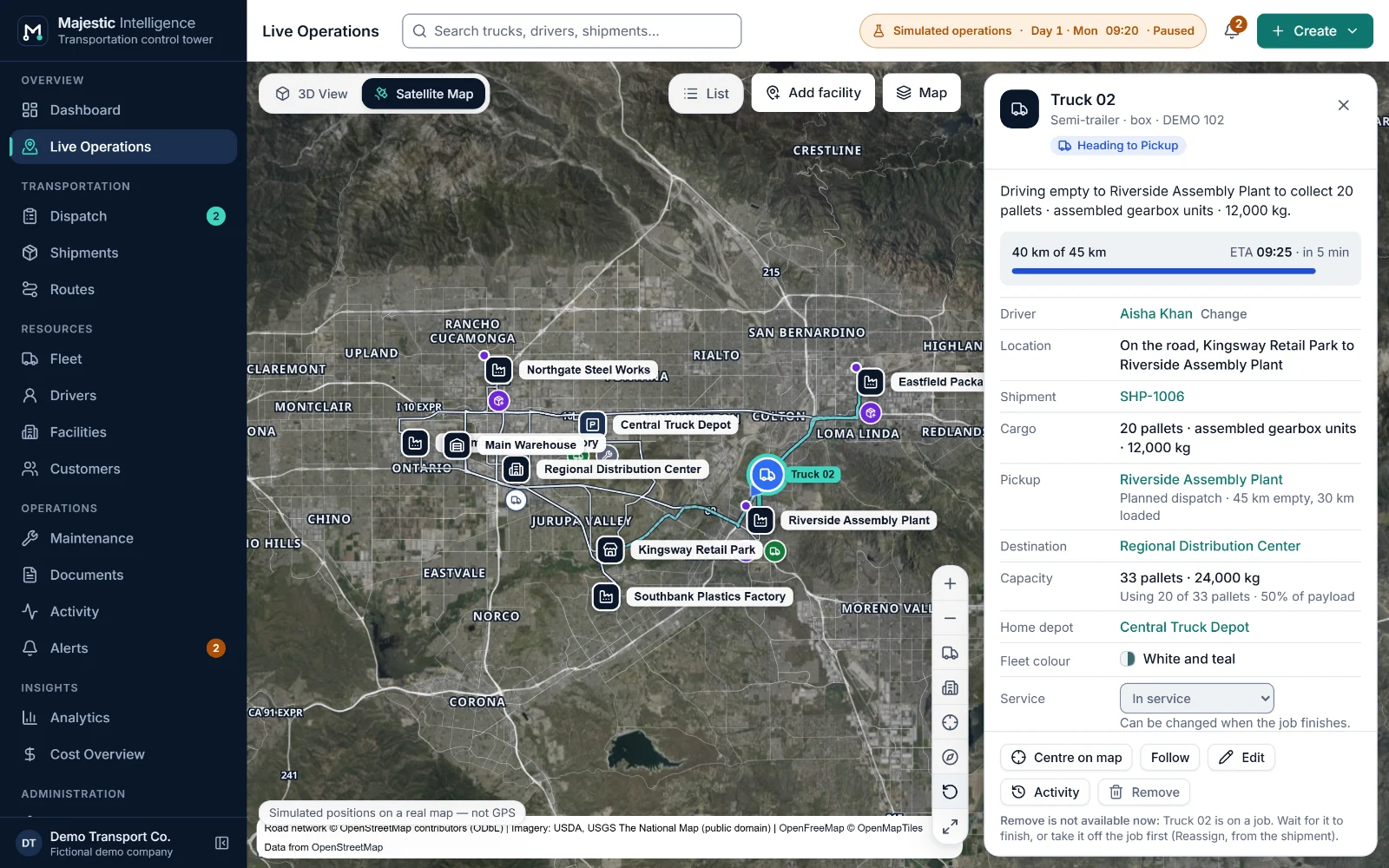
A dashboard of what needs a decision, and every truck and facility on a satellite map or a 3D view of the operation.
Business value. Majestic Intelligence turns the operation into one picture that an owner and a dispatcher read the same way: what every truck is doing, where the goods are, and what needs attention now, with the reason and the next step written out.
What it does
- Dashboard. Key figures, "Needs attention" with the action that resolves each item, quick actions, a map preview, upcoming arrivals, pending pickups, driver assignments, shipment performance and facility activity.
- Two views of one operation. A 3D view of the facilities on a schematic industrial plan, and a satellite map with labels, satellite, road and dark base maps. Both show the same trucks at the same moment and share the selection.
- Trucks on real roads. Each truck is drawn along the road it is driving, from its motion plan. Journeys are solid when loaded and dashed on an empty run, and the selected truck's way ahead is highlighted.
- Operations list and detail drawer. Trucks, shipments, facilities and activity in tabs, with status filters and search. Selecting anything opens its detail: status, driver, shipment, cargo, ETA and recent events.
- Needs attention. Each alert says what happened, why it matters and what to do, with buttons for the fix. "Action needed" for decisions now; "Watch" for things worth knowing.
- Map tools. Fit all trucks or facilities, focus on the selection, follow a truck, tilt, point north, full screen, a saved starting view, and an offline map from bundled roads when imagery cannot be reached.
Benefits
- Know what every truck is doing without phoning drivers.
- See a late delivery, a dock queue or a missing document while there is still time to act.
- Give the owner and the dispatcher the same picture of the day.
- Every view has a plain text equivalent, operable from the keyboard.
Plan and run
Dispatch
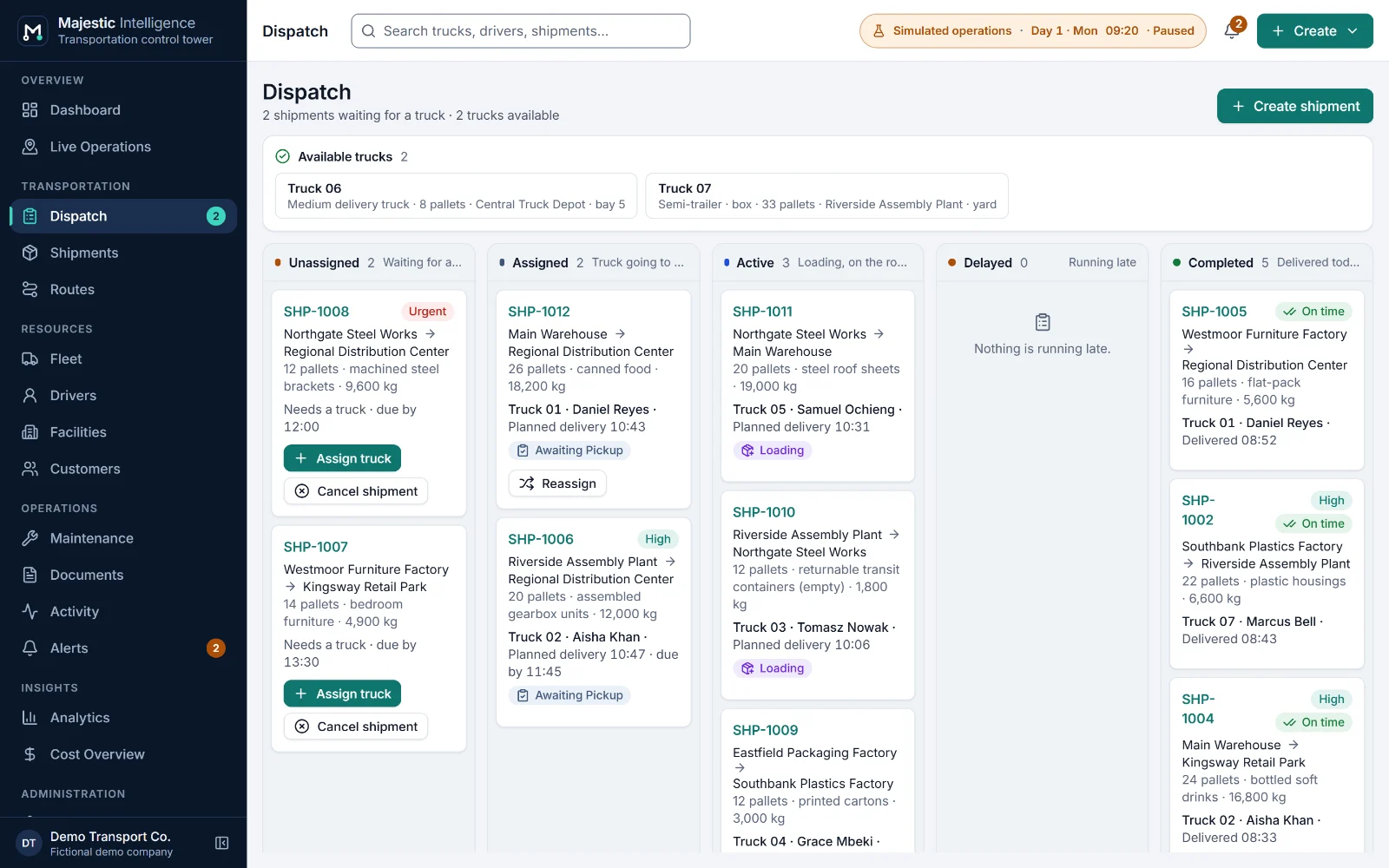
A dispatch board by stage, suggested trucks with the reasons in words, and planned dispatch by rules you can read.
Business value. Every assignment is checked by the same rules, whether a person or the planned dispatch makes it. Suggestions read like a colleague's advice ("At the pickup by 10:42 · Meets the deadline · 10 of 14 pallets · 5 h of shift left"), so the dispatcher stays in charge and new staff learn the reasoning.
What it does
- Dispatch board. Shipments in columns by stage, with the trucks available now. Delayed work has its own column, each delay with a cause: traffic, late departure, waiting for a dock or late at the pickup.
- Suggested trucks. Best match first: suitable truck, earliest at the pickup, meets the deadline, smallest that fits, most shift left. Trucks that cannot take the work are listed with the reason.
- Planned dispatch. The scenario's daily bookings are given to the best free truck by the same explainable rules a few minutes after they arrive, between 05:50 and 20:00; shipments you create wait for you. No machine learning and no scores; it can be switched off in Settings.
- Guarded assignments. A truck must be in service, have a body that suits the goods and the capacity for them; the driver must hold the right licence class and have a shift that covers the job, all the way back to the depot.
- Create, reassign and cancel. Create a shipment or a transport job from the header. Reassign or cancel while the truck is assigned, or once it has reached the pickup and before loading starts, but not while it is driving there. The truck becomes available where it stands.
- Returns to the depot. Send a free truck home as an empty run, or let trucks left without work away from home return by themselves after 45 minutes.
Benefits
- Fewer wrong assignments: the rules are checked every time, not remembered.
- Faster decisions, with the reasons written next to each suggestion.
- Delays explained by cause, so the right person can act.
- Routine bookings handled by planned dispatch, exceptions left to people.
Plan and run
Shipments and documents
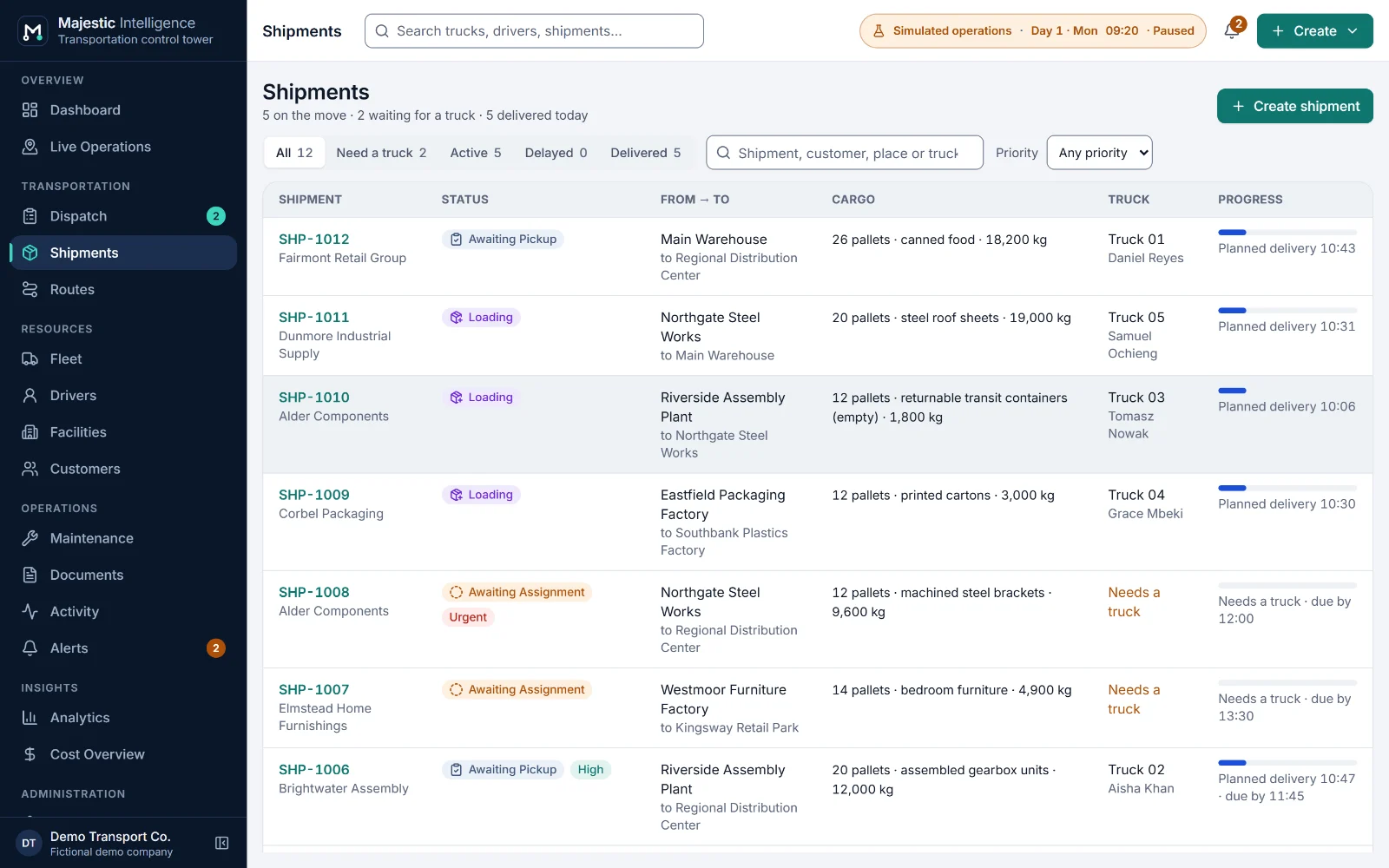
Every shipment with its timeline, priority and deadline, and its bill of lading and proof of delivery tracked to the end.
Business value. Each shipment shows where the goods are and whether they will make the deadline. Documents follow the job automatically, the missing ones come first on the Documents screen, and they appear in "Needs attention" as Action needed.
What it does
- Shipments. Customer, pickup, destination, cargo in pallets and kilograms, priority (Standard, High, Urgent) and an optional delivery deadline. Lateness is recorded on arrival.
- Shipment timeline. Every milestone with its simulated time, from assignment to the end of unloading, beside the truck, the driver and the route driven.
- Bill of lading. Expected when a truck is assigned; signed at pickup by the pickup's contact and the driver when the truck leaves with the goods.
- Proof of delivery. Expected until unloading finishes; then Received, or Awaiting signed copy if it did not come back with the driver, and Missing four hours later.
- Attached scans. Attach a PDF, PNG, JPEG or WebP scan to a document. In the demo it stays in your browser and is never uploaded.
- Customers. Each customer with a contact and the facilities where its goods are usually collected and delivered, offered first when booking.
Benefits
- Answer "where are my goods?" from one screen.
- Missing proofs of delivery found the same day, not at month end.
- Deadlines at risk flagged before they are missed.
- One record of what happened to each shipment, in plain language.
Resources
Fleet and maintenance
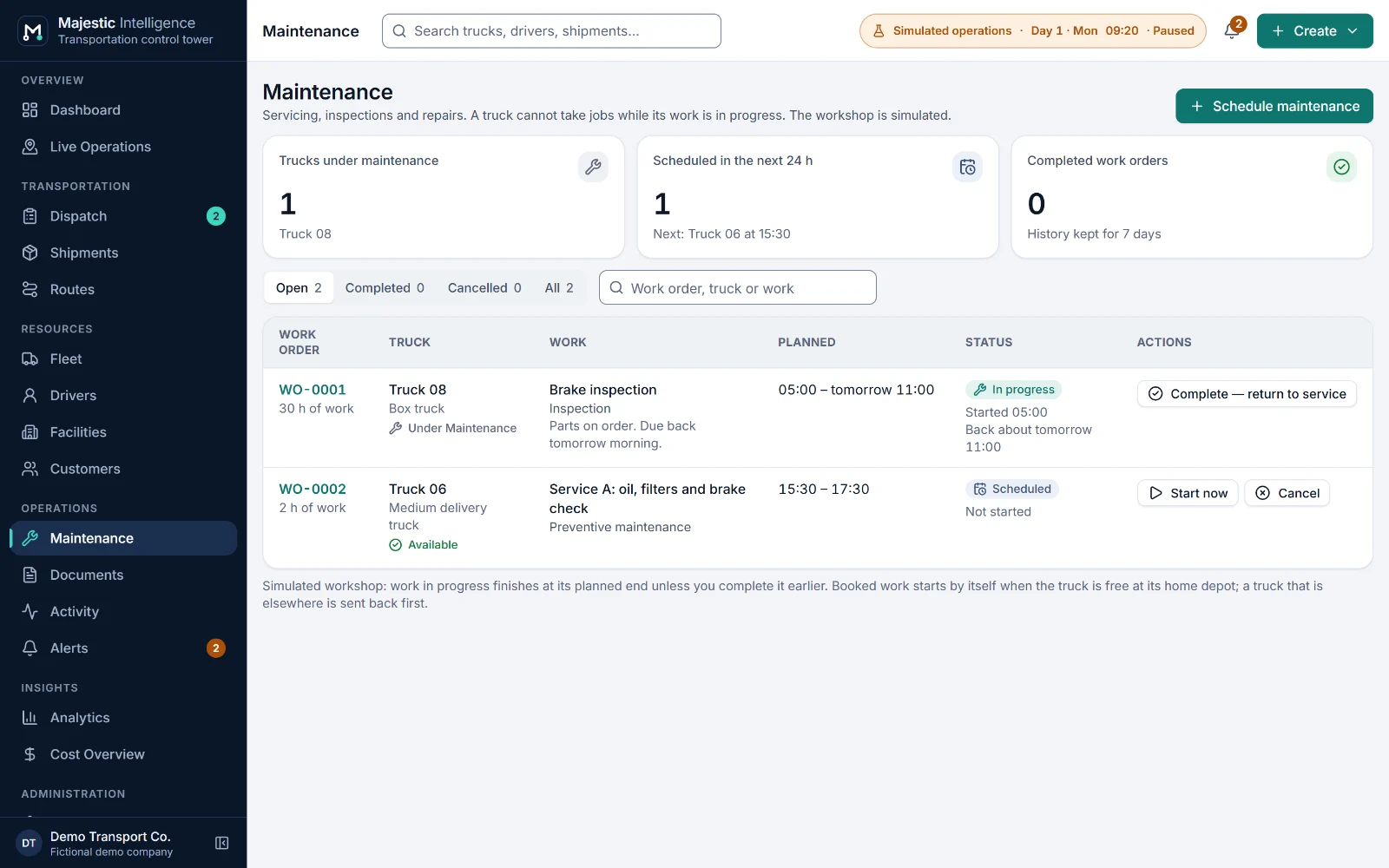
Trucks, drivers and shifts, and maintenance work orders that dispatch respects.
Business value. In Majestic Intelligence a truck is under maintenance exactly while one of its work orders is in progress, and dispatch will not offer work that would run past its next planned maintenance. Maintenance due soon and missed slots appear in "Needs attention".
What it does
- Trucks. Semi-trailers with box, curtain-side or flatbed bodies, rigid trucks and medium delivery trucks, each with capacity in pallets and kilograms, a home depot and a service state.
- Drivers and shifts. Licence class (articulated or rigid), a daily shift of 4 to 12 hours, leave, and the truck a driver is with. Driver status is on a job, on shift, off shift or on leave.
- Maintenance work orders. Preventive maintenance, inspection, repair, tires or other work, with a planned start and duration: scheduled, in progress, completed or cancelled.
- Service states. In service, under maintenance or out of service. Only trucks in service are offered work, and the map shows the rest for what they are.
- Body fit and capacity. Flatbeds carry only metal goods and building materials; everything else needs a body that closes. Pallets and weight are both checked.
- Maintenance alerts. "Maintenance due soon" and "Maintenance slot missed" in Needs attention, with the work order one click away.
Benefits
- No jobs booked over a workshop slot.
- The right truck for the goods, checked automatically.
- Shift-aware assignments that bring the driver home in time.
- Maintenance visible to the people who plan the work.
Resources
Network and routes
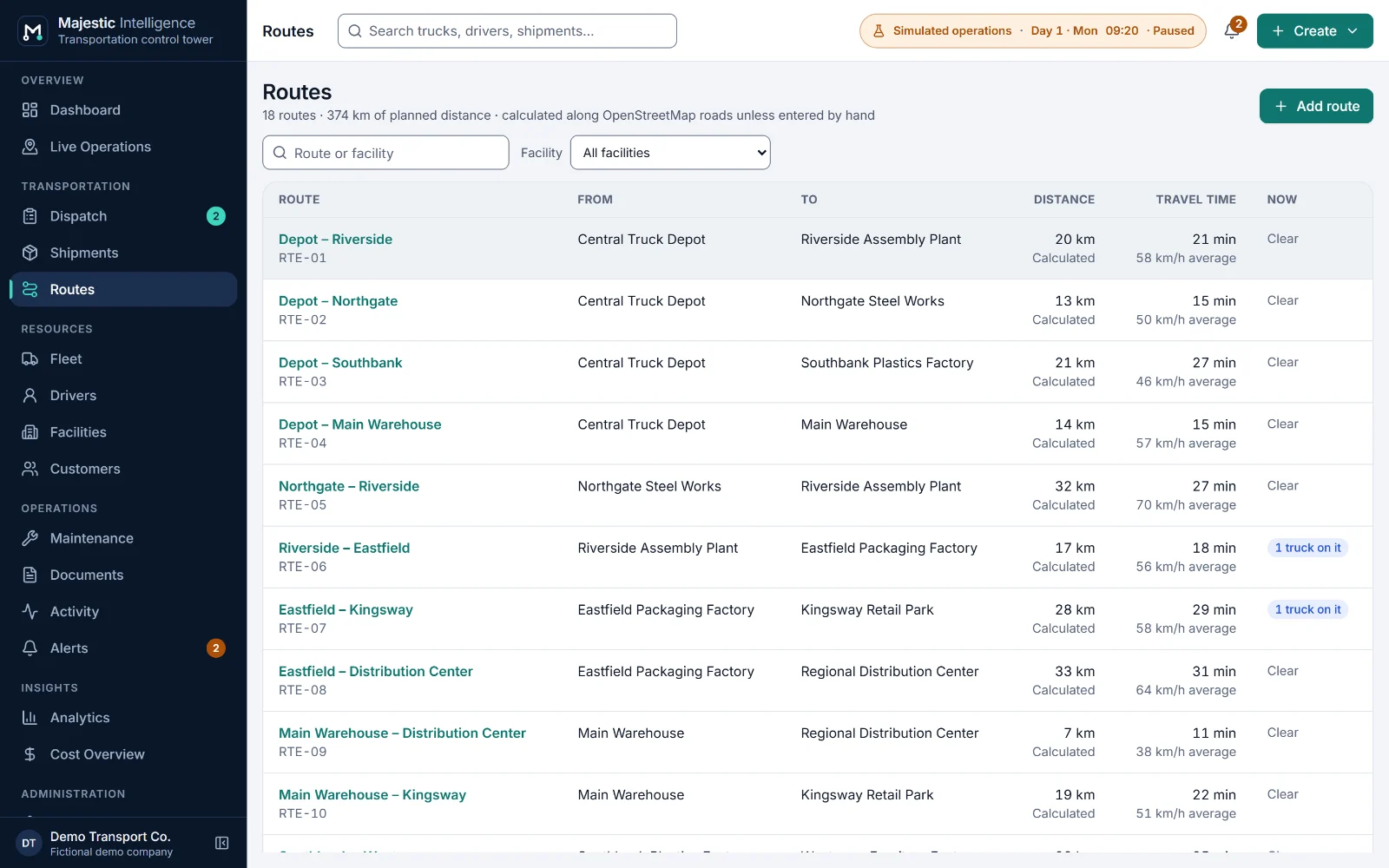
Facilities placed on the map, customer records, and routes calculated along real roads.
Business value. Place a facility by clicking the map, and Majestic Intelligence connects it to the nearest suitable road. Routes get a calculated distance and driving time that the operator may override, and both are labelled wherever the route appears.
What it does
- Facilities on the map. Factories, warehouses, distribution centers, truck depots and customer sites, placed by clicking the map, with docks, parking bays and working hours (for reference).
- Road access. Each site is joined to the nearest road a truck could turn into, never a freeway or a ramp. Beyond 400 m the access is called approximate; with no road within 1.5 km, the form says so.
- Routes along real roads. Distance and driving time calculated in the browser along the bundled road network at typical truck speeds per road type, or entered by the operator.
- Customers. Contact, phone, email, city and usual facilities. Every shipment belongs to one customer.
- Docks and yards. Trucks reserve a dock on arrival or wait in the yard, first come first served, and dock activity shows on each facility.
- Simulated traffic notices. In the "Inland Empire with simulated roadworks" scenario (chosen in Settings), clearly labelled simulated roadworks slow part of a route, re-plan the trucks driving it, and show as a dashed amber stretch on the map.
Benefits
- Distances and driving times grounded in real roads.
- A network anyone can read from the map.
- Changes made once and used by dispatch, routes and analytics.
- Customer details where the booking happens.
Measure
Analytics and costs
On-time delivery, utilisation, empty distance and lane performance, and an illustrative cost overview.
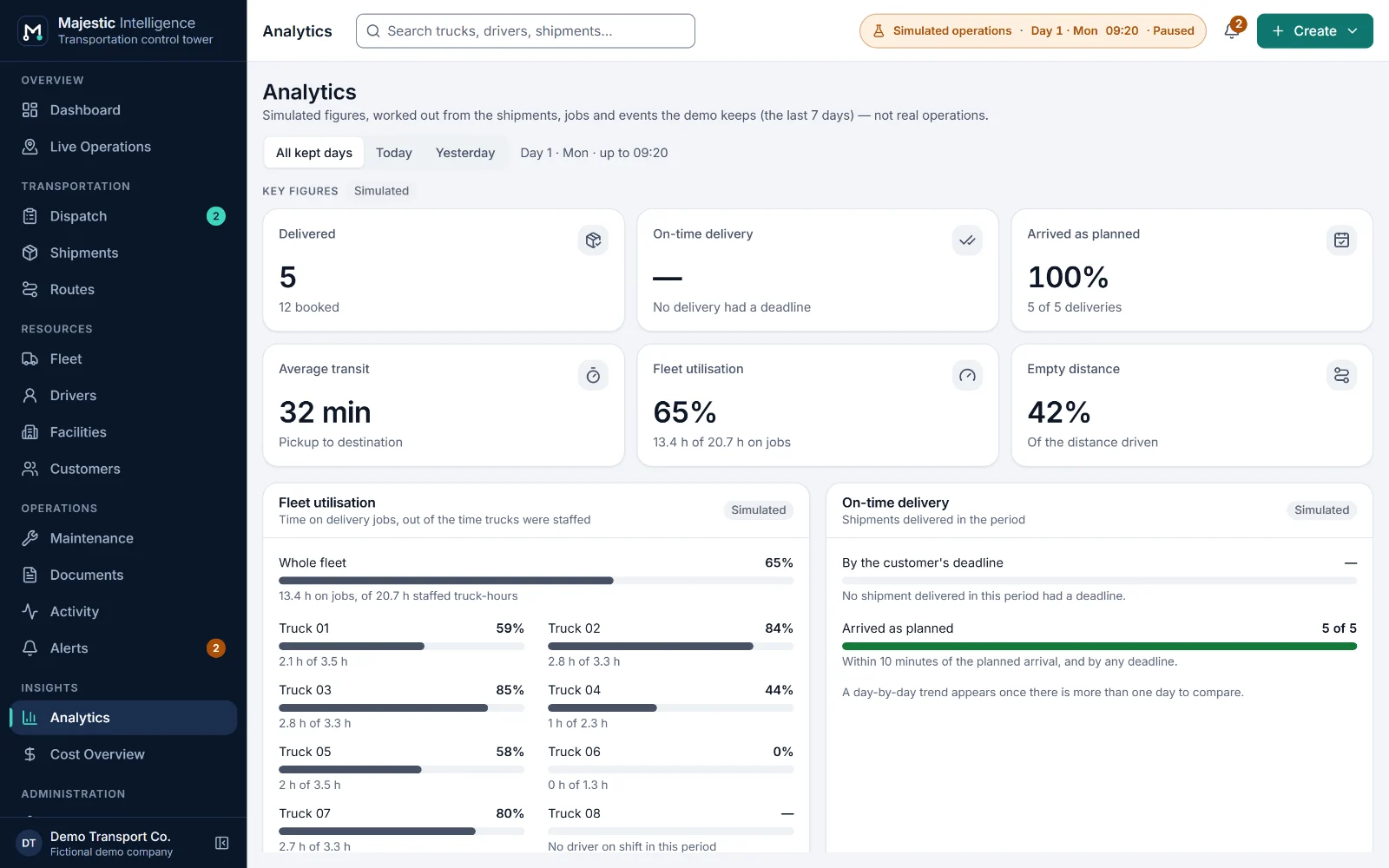
Business value. Each figure is computed from the operation and defined in plain words, so it can be checked against the jobs behind it. Lanes that run late, trucks that wait and kilometres driven empty become visible while the pattern is still forming.
What it does
- Delivery performance. On-time delivery against customers' deadlines, deliveries that arrived as planned, and average transit from pickup to destination.
- Fleet utilisation. Truck-hours on delivery jobs against truck-hours in service with a driver on shift; empty distance as a share of all kilometres driven.
- Route performance, by lane. Deliveries, average transit and the late share for each lane: each pickup-to-destination pair, whichever roads the trucks took.
- Dwell at the pickup. How long trucks spend at pickup facilities, from arrival to departure.
- Cost overview. Revenue estimate, cost estimate (fuel, driver pay for the hours on the job, maintenance) and contribution before overheads for each delivered shipment, with totals by customer, by lane and by day, from example rates you set.
- Activity and history. A plain-language log of operational events, kept for 3, 7 or 14 days, with an export of the history.
Benefits
- Figures defined in words, so they can be trusted and checked.
- Late lanes and empty running found while there is time to act.
- A contribution view that names what it leaves out.
- History you can export before it is cleared.
Across every screen
Built for everyday use. Small things that save time.
The qualities that make the product comfortable to use all day, whatever screen you are on.
- Global search
- Find any truck, driver, shipment, facility or route from the header.
- Notification centre
- Arrivals, deliveries and delays collected in one place instead of pop-ups.
- Keyboard and screen reader
- Every screen works from the keyboard, and the map has a complete text equivalent.
- Light and dark themes
- Plus metric or imperial units and a 24- or 12-hour clock.
- Days that run on
- The operation continues across midnight, with each day's freight booked again.
- Saved in your browser
- Changes are kept as a validated checkpoint on this device; nothing is sent to a server.
Honest scope
Not in the product yet. Built when you need it.
These are common in transportation management systems and are not part of Majestic Intelligence today. METHODSS can scope and build them as part of your deployment.
- Rates, invoicing and payments
- Hours-of-service compliance calculations
- Multi-stop, less-than-truckload work and trailer swaps
- Real vehicle tracking from telematics or ELDs
- Customer portals and a driver app
- Dock appointments, refrigerated or hazardous freight
- Integrations with ERP, accounting and carrier systems
See it working
Watch a simulated carrier run its day.
Open the working product: trucks loading, on the road and unloading across California’s Inland Empire. No sign-up; nothing connects to real systems.
Built by METHODSS
Need a custom logistics solution? Let’s build it together.
METHODSS adapts Majestic Intelligence to your fleet, sites and rules and connects it to your data, or designs and builds new logistics software with you.