Logistics intelligence platformby METHODSS

Logistics management software with a control tower on a real map.

Majestic Intelligence brings dispatch, shipments, fleet, drivers and documents together around one picture of your operation, so you can see what every truck is doing and what needs a decision, at a glance.

Opens the working product on a simulated carrier. No sign-up; nothing connects to real systems.

majestic.methodss.com/demo/ · Dashboard
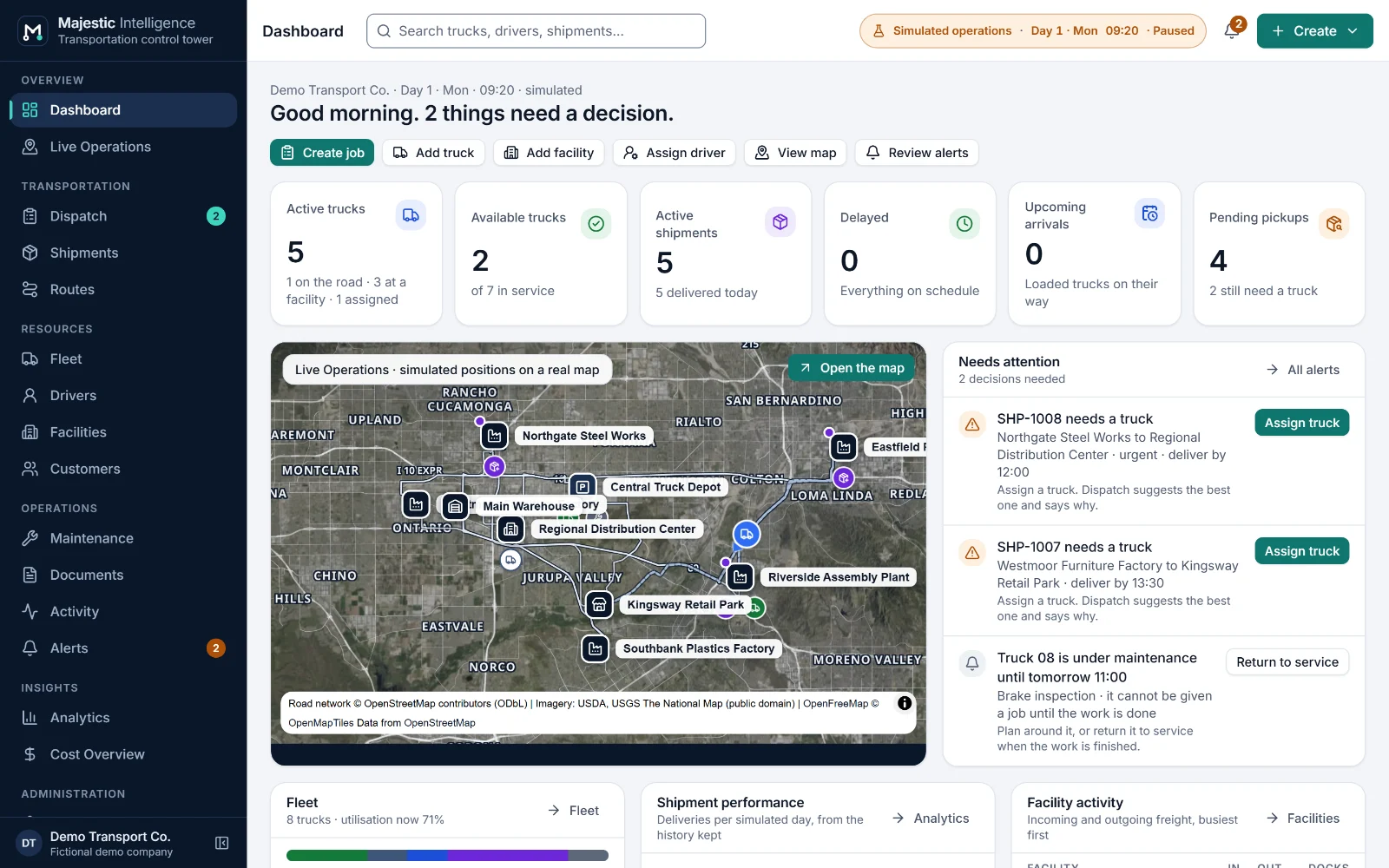
Majestic Intelligence logistics dashboard: key figures, a list of items that need attention, a map preview of trucks and facilities, and upcoming arrivals.

The Dashboard: key figures, what needs attention and a map preview. Simulated data.

Open Dashboard in the demo

Built into the product today

  • 16 working screensFrom the Dashboard to Settings
  • Routes on real roadsBuilt from OpenStreetMap
  • Rules you can readEvery suggestion explained
  • Paperwork trackedBills of lading and PODs
  • Days that run onFreight booked every day
  • Keyboard friendlyWith a text view of the map

Majestic Intelligence × METHODSS

Ready to explore. Built to fit your operation.

Majestic Intelligence is a logistics intelligence platform designed and engineered by METHODSS. Try it as it is, have it adapted to your company, or have something new built.

  1. Explore Majestic Intelligence

    Start the demo and run a simulated carrier’s day: dispatch a shipment, follow the truck, check the paperwork and the figures.

  2. Make it yours

    METHODSS adapts the platform to your fleet, sites, rules and brand, and connects it to your own data in place of the simulation.

  3. Build something new

    Need software the platform does not cover? METHODSS designs and builds custom logistics software with you.

Why it matters

Where a trucking day goes wrong, and what changes.

Much of the avoidable cost and delay in a transport operation hides in small, repeated moments: a call to find a truck, an assignment made from memory, a document nobody chased. Majestic Intelligence makes each of them visible.

Where is every truck, and what is it doing?

Without
Phone calls to drivers and a whiteboard that is out of date by mid-morning.
With Majestic Intelligence
Every truck on the map with its status: heading to pickup, loading, in transit, unloading or available. The operations list says the same in words.
Which truck should take this shipment?

Without
Memory and habit. A flatbed offered for boxed goods, or a driver whose shift ends halfway home.
With Majestic Intelligence
Suggested trucks with the reasons written out, and every assignment checked against body, capacity, licence, shift and planned maintenance.

Is the paperwork back?

Without
A missing proof of delivery discovered when the invoice is due.
With Majestic Intelligence
A bill of lading and a proof of delivery tracked for every job, the missing ones first, and an alert four hours after unloading.

How did today actually go?

Without
Figures that arrive at month end, when nothing can be changed.
With Majestic Intelligence
On-time delivery, utilisation, empty distance and lane performance as the days run, with an illustrative view of revenue, cost and contribution.

The product

One platform for the transport day, from booking to proof of delivery.

These are the real screens, running on the demo's simulated carrier. Choose one to see it, or open it in the demo.

majestic.methodss.com/demo/ · Dispatch
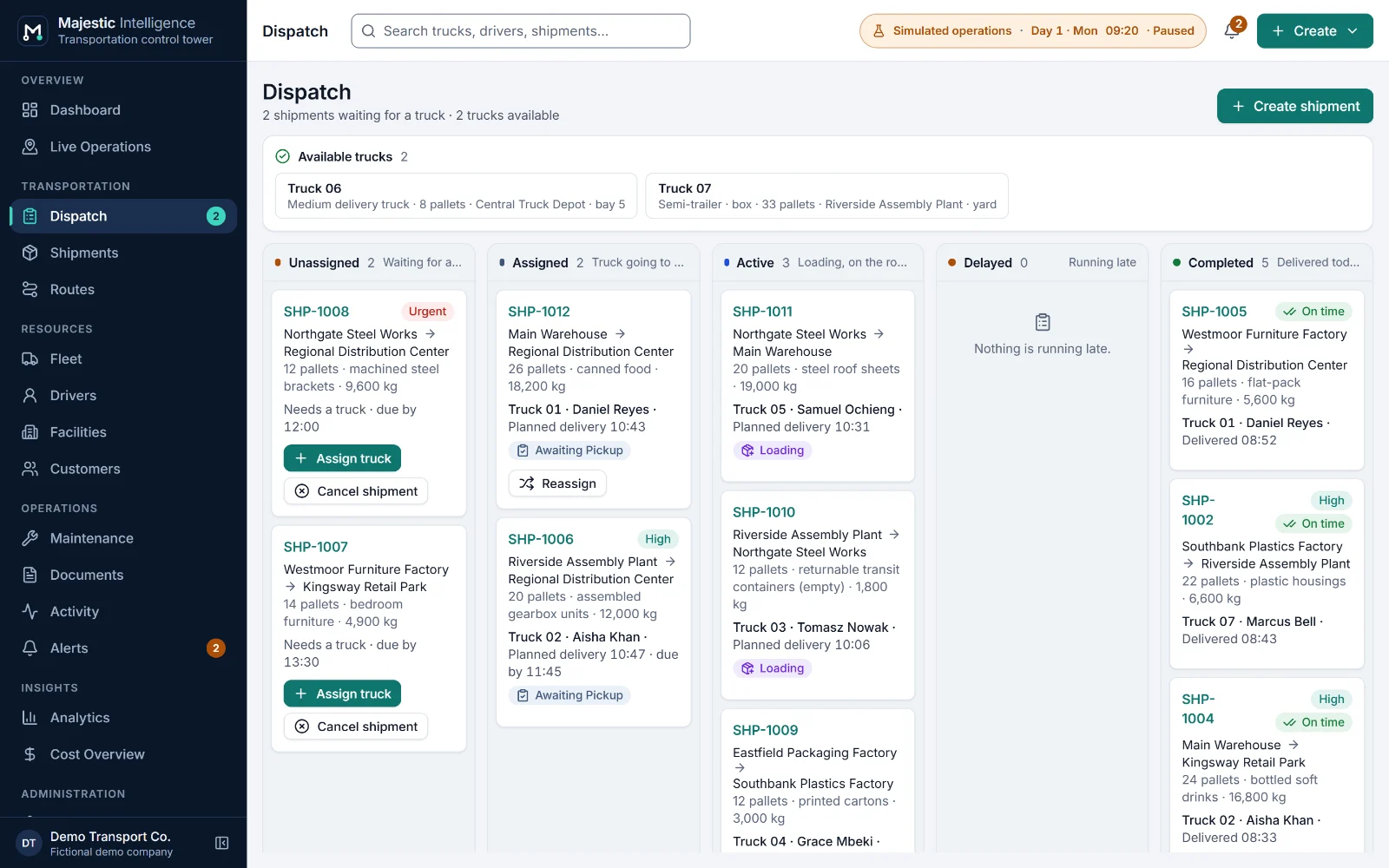
The Dispatch board: shipments in columns for unassigned, assigned, active, delayed and completed work, with the trucks available now.

The Dispatch board, with shipments by stage and the trucks available now. Simulated data.

Open Dispatch in the demo
  • Unassigned to completed, by column
  • Delays with their cause
  • Planned dispatch by readable rules
  • Reassign at the pickup, before loading

Control tower

Two views of one operation. Same trucks, same moment.

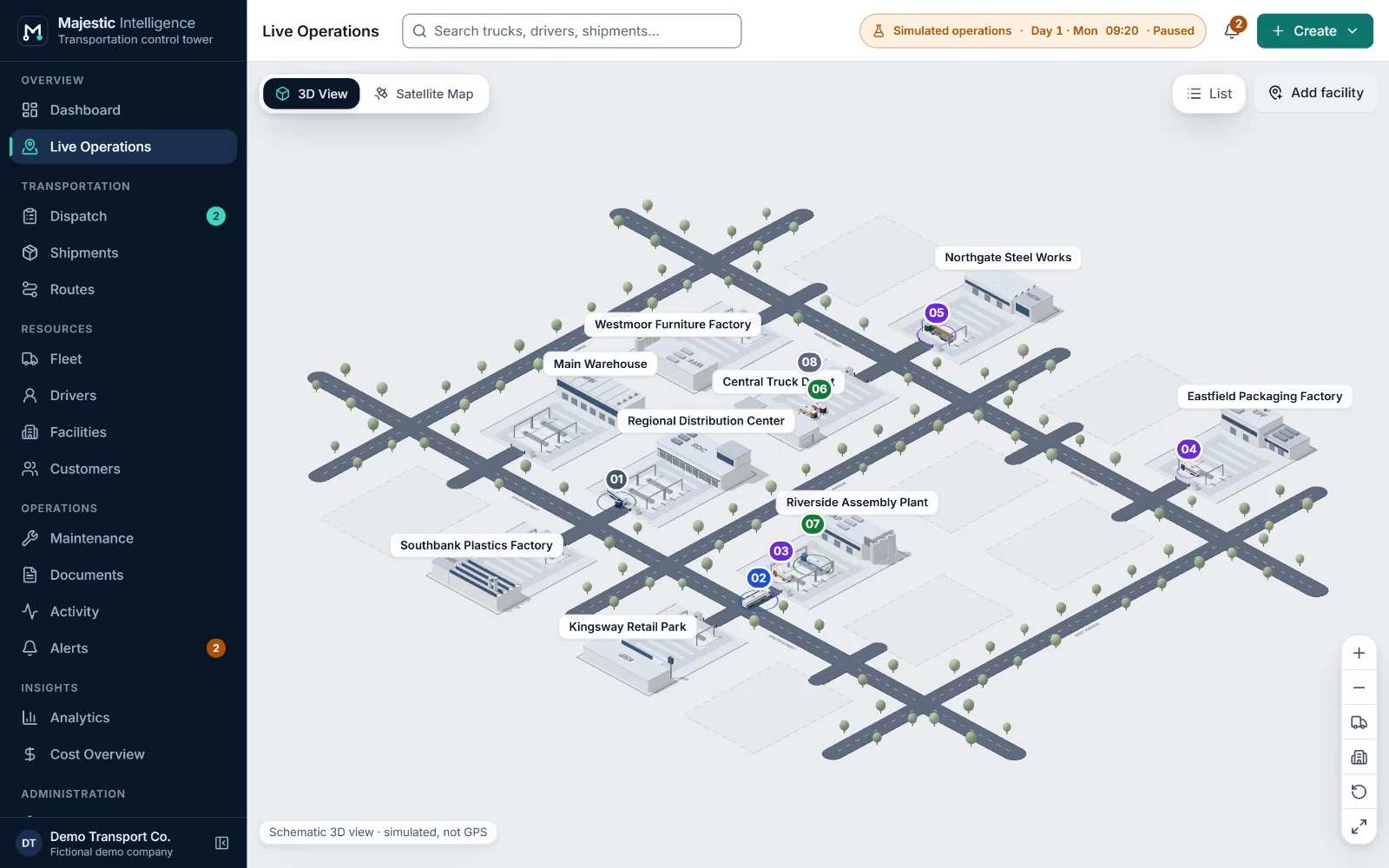
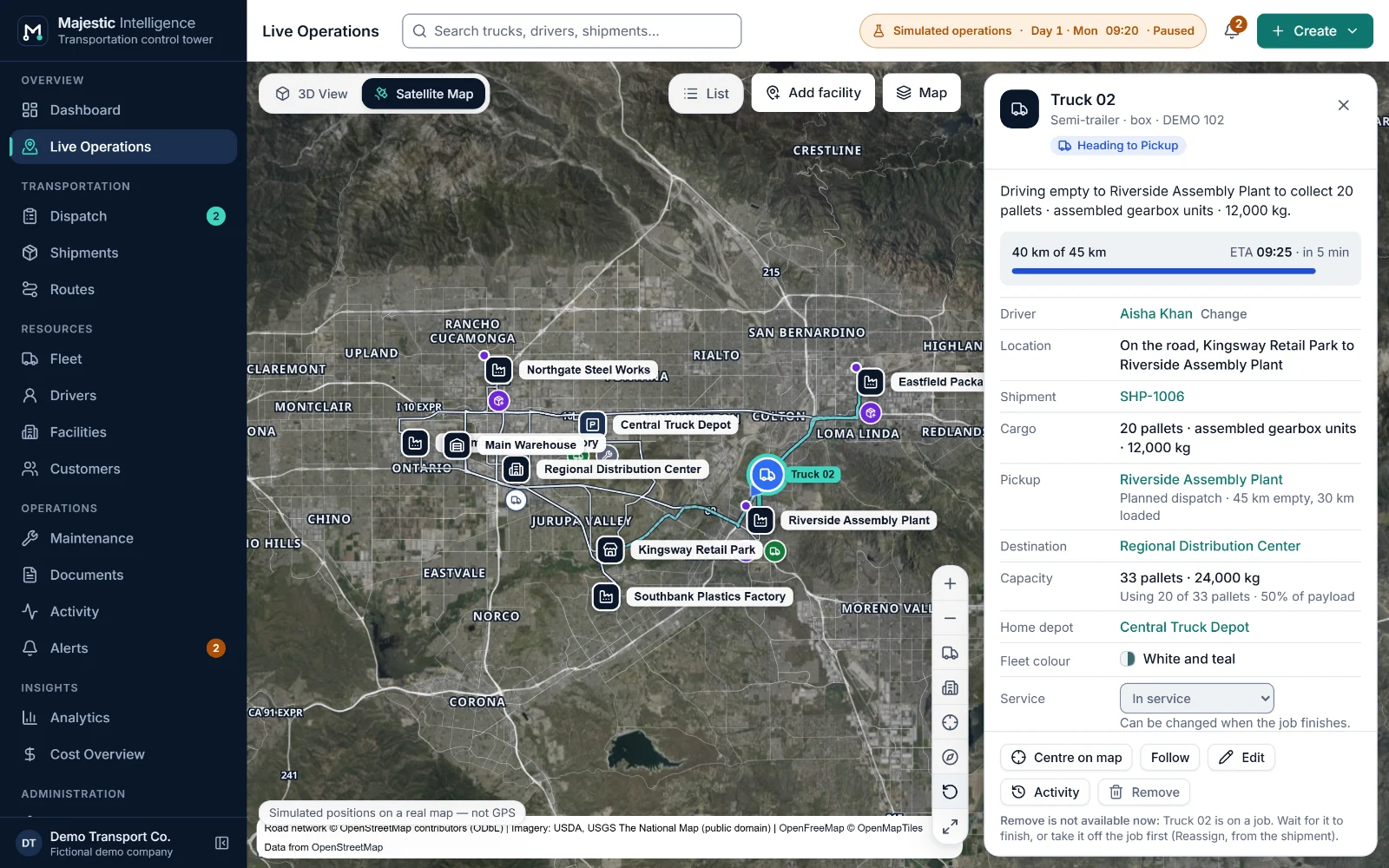
Live Operations shows the operation as a schematic 3D view of your sites and as a satellite map at real coordinates. Switch between them and the selection comes with you.

majestic.methodss.com/demo/ · Live Operations, 3D view
The 3D view of Live Operations: facilities on a schematic industrial plan with trucks at their docks and on the roads between them.
Live Operations in the 3D view: the same operation on a schematic plan. Simulated data.Open Live Operations in the demo
majestic.methodss.com/demo/ · Live Operations, satellite map
Live Operations on a satellite map of the Inland Empire, California: truck markers on real roads, facility markers, and a selected truck with its detail drawer.
Live Operations on the satellite map: simulated positions on a real map, not GPS. Simulated data.Open Live Operations in the demo

Drawn from the plan

Each truck’s position is computed every frame from its motion plan: along real roads on the satellite map, and along the plan’s roads in the 3D view, which is schematic and not to scale.

Labelled, never GPS

Positions in the demo are simulated and say so on screen: “Simulated positions on a real map — not GPS”.

A list for every picture

The operations list beside the map is its complete text equivalent, for the keyboard, screen readers and small screens.

How it works

From booking to proof of delivery, in five steps.

See how it works
  1. Step 1: Set up your network

    Facilities on the map, customers, trucks, drivers and their shifts. Routes are calculated along real roads.

  2. Step 2: Book shipments

    Customer, pickup, destination, cargo, priority and an optional deadline. In the demo, the scenario’s daily freight is booked again each midnight.

  3. Step 3: Dispatch

    Choose from suggested trucks with their reasons, or let planned dispatch assign routine work by the same rules.

  4. Step 4: Follow every job

    Heading to pickup, loading, in transit, unloading: on the map, on the board and in plain words.

  5. Step 5: Close and measure

    Proof of delivery back, the job complete, and the figures updated for the day and the lane.

Platform capabilities

Everything a carrier runs on, in one place.

See all features

Control tower

A dashboard of what needs a decision, and every truck and facility on a satellite map or a 3D view of the operation.

  • Dashboard
  • Two views of one operation
  • Trucks on real roads

Dispatch

A dispatch board by stage, suggested trucks with the reasons in words, and planned dispatch by rules you can read.

  • Dispatch board
  • Suggested trucks
  • Planned dispatch

Shipments and documents

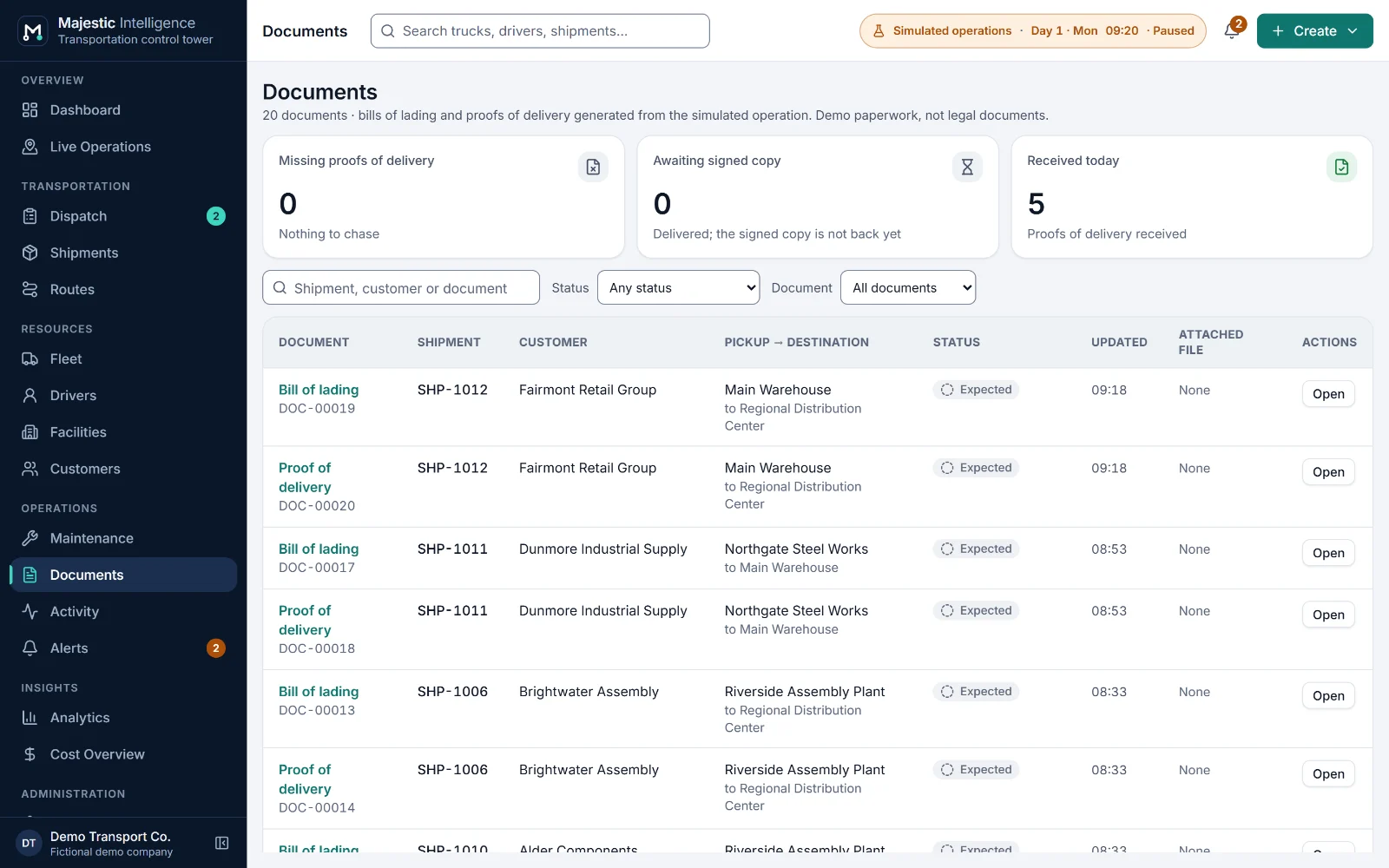
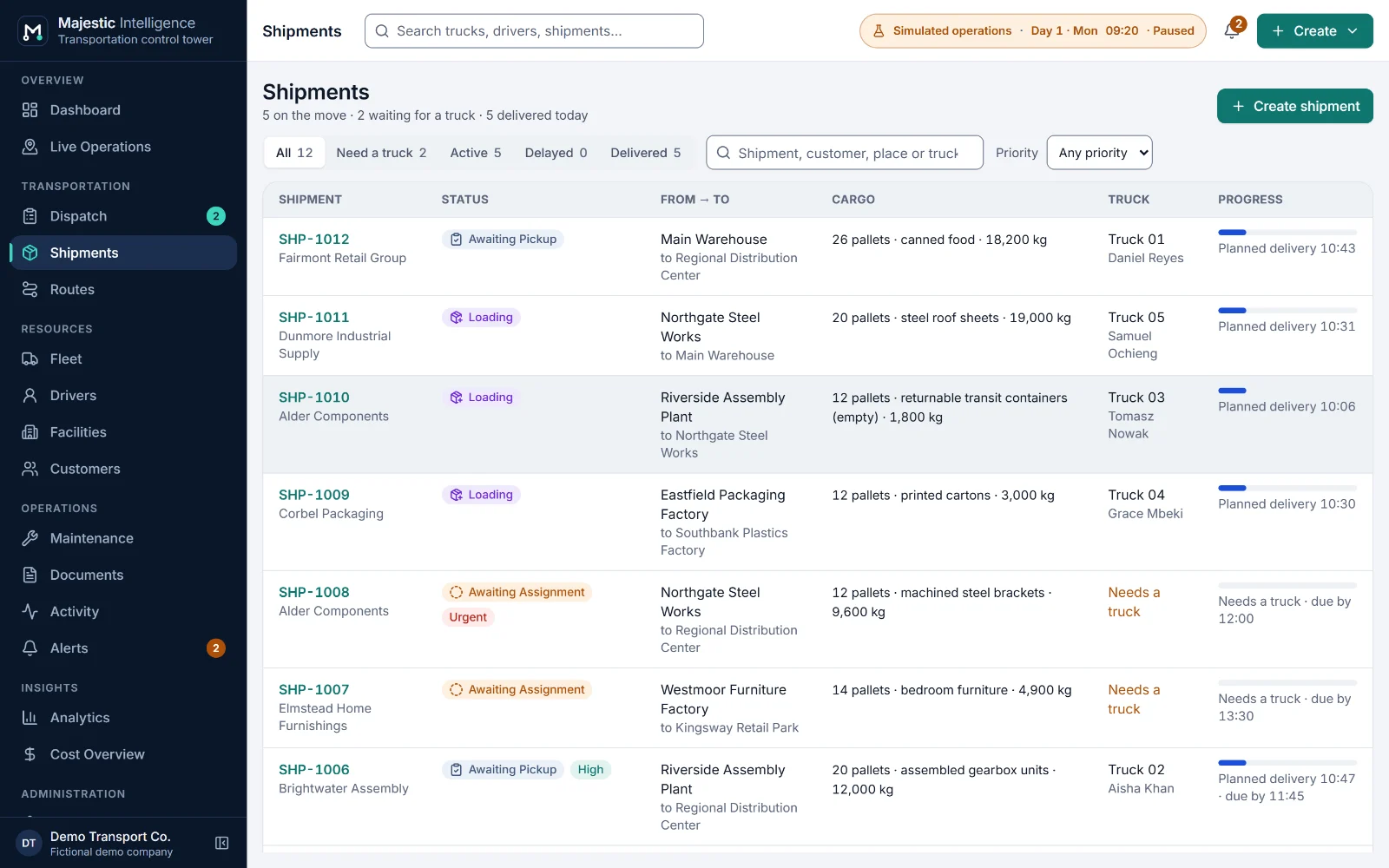
Every shipment with its timeline, priority and deadline, and its bill of lading and proof of delivery tracked to the end.

  • Shipments
  • Shipment timeline
  • Bill of lading

Fleet and maintenance

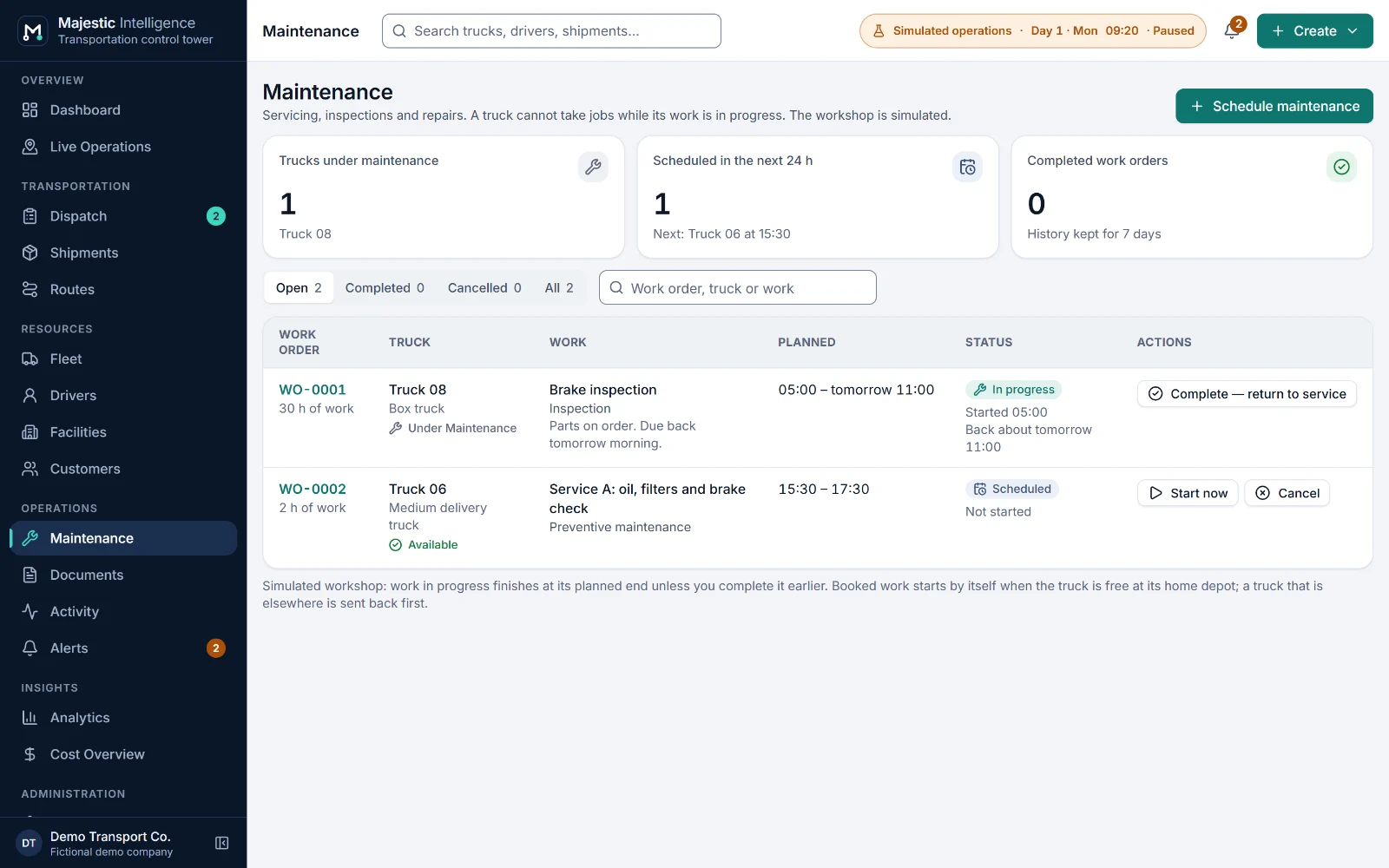
Trucks, drivers and shifts, and maintenance work orders that dispatch respects.

  • Trucks
  • Drivers and shifts
  • Maintenance work orders

Network and routes

Facilities placed on the map, customer records, and routes calculated along real roads.

  • Facilities on the map
  • Road access
  • Routes along real roads

Analytics and costs

On-time delivery, utilisation, empty distance and lane performance, and an illustrative cost overview.

  • Delivery performance
  • Fleet utilisation
  • Route performance, by lane

Dashboard and analytics

Figures you can trace to the jobs behind them.

Every figure is computed from the operation and defined in words, so an owner can trust it and a dispatcher can act on it.

On-time delivery
Deliveries with a customer deadline that arrived by it.
Fleet utilisation
Truck-hours on delivery jobs, out of truck-hours in service with a driver on shift.
Empty distance
Kilometres driven without cargo, as a share of all kilometres driven.
Contribution before overheads
Revenue estimate minus cost estimate, at example rates you set. Never called profit.
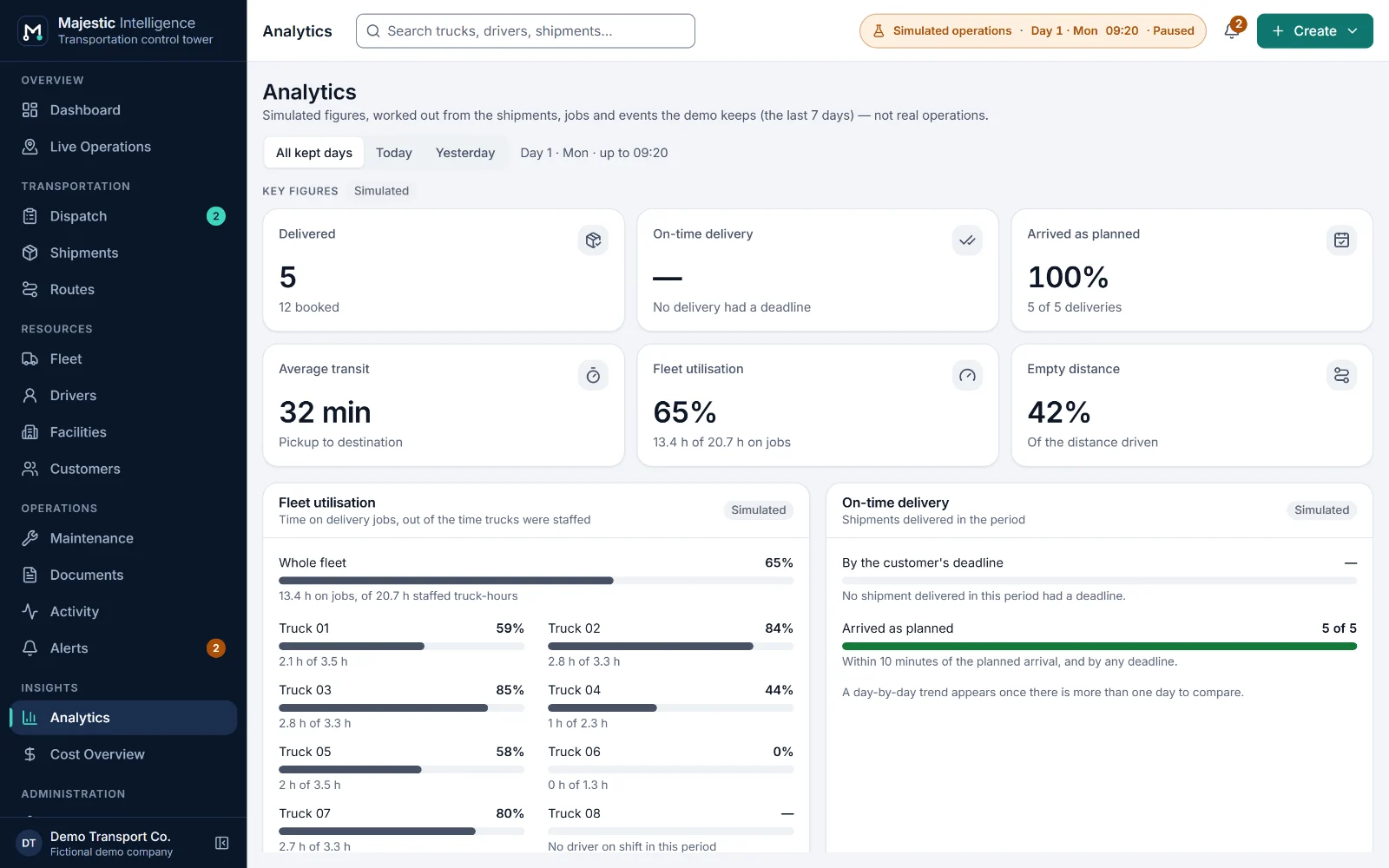
majestic.methodss.com/demo/ · Analytics
The Analytics screen: on-time delivery, fleet utilisation, empty distance, average transit and performance by lane.
Analytics over the days kept, each figure defined in words. Simulated data.Open Analytics in the demo

Why Majestic Intelligence

Serious software for people who run trucks. Calm, precise and honest.

Understood at a glance

Designed against one question: would a logistics company owner understand this the first time they see it?

The picture is true

What you see follows the operation’s state. A truck can never show In transit while its shipment says Delivered.

Rules, not a black box

Dispatch suggestions follow rules you can read, with the reasons beside every truck. No scores, no guesswork.

Honest about simulation

Demo data is always labelled simulated. Nothing is presented as live tracking until it is.

Accessible by design

Designed to WCAG 2.2 AA, with keyboard paths everywhere and a complete text equivalent for the map.

Built to connect

Data sits behind contracts, designed so that a real data source can replace the simulation while the screens and rules stay.

Use cases

Built for carriers and companies with their own fleet. One picture for every role.

Regional carriers moving full truckloads between factories, warehouses and distribution centers, and manufacturers or distributors running their own trucks.

Owners

See the whole operation in a minute: what is moving, what is late, what needs a decision.

Starts on Dashboard

Dispatchers

Match shipments to trucks and drivers with suggestions that explain themselves, and handle the exceptions.

Starts on Dispatch

Fleet managers

Plan maintenance where dispatch can see it and keep every truck’s body, capacity and service state right.

Starts on Maintenance

Customer service

Answer “where are my goods?” from one screen, with the paperwork alongside.

Starts on Shipments

What is real

Working today in the demo. Built for your deployment.

Majestic Intelligence runs today as a complete demonstration on a simulated operation. Putting it to work on your trucks is a project METHODSS scopes and builds with you.

In the demo today

  • Dashboard and Live Operations with a 3D view and a satellite map
  • Dispatch board, suggested trucks and planned dispatch
  • Shipments, customers, bills of lading and proofs of delivery
  • Fleet, drivers and shifts, maintenance work orders
  • Facilities on the map and routes along real roads
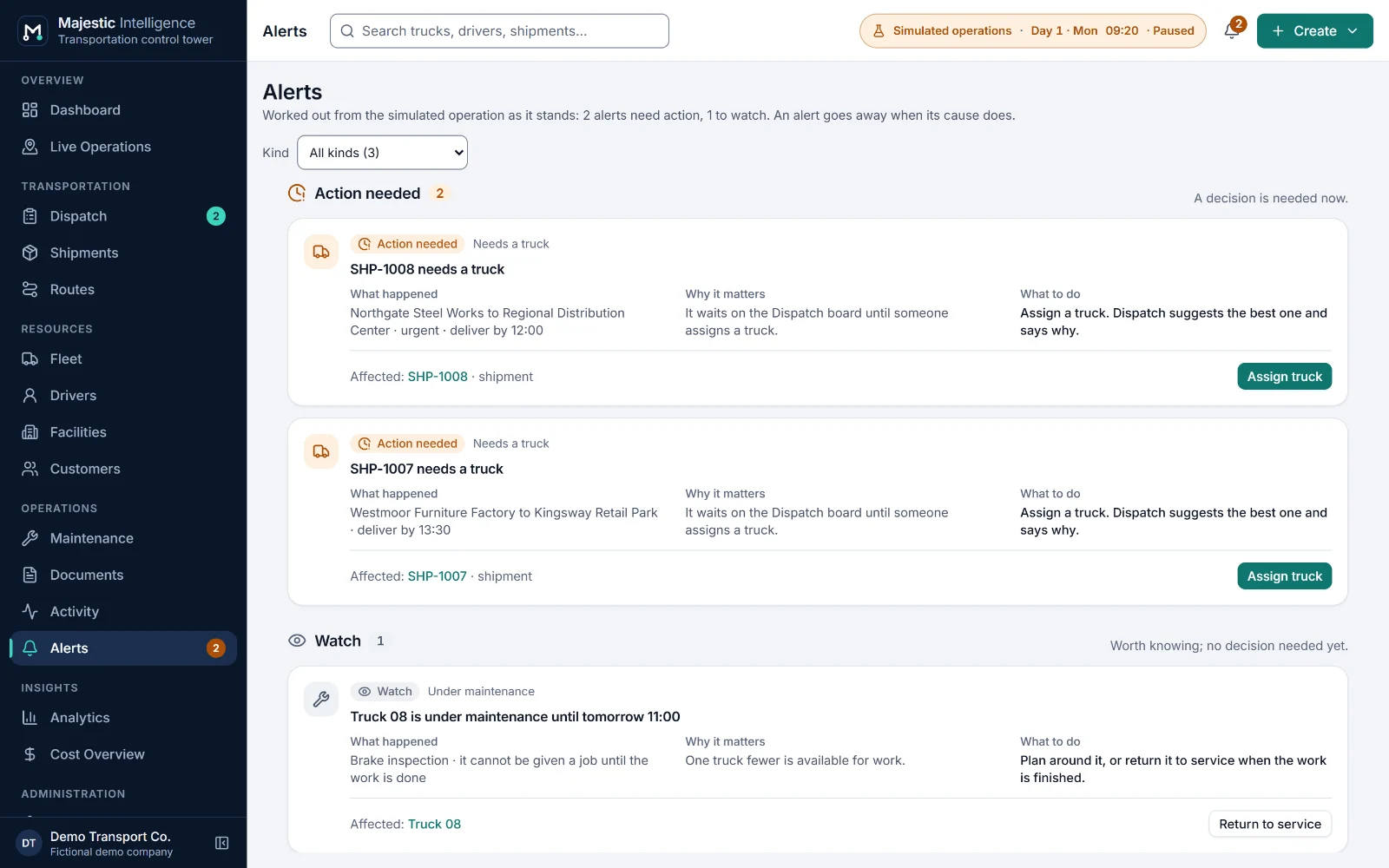
  • Alerts, activity, analytics and an illustrative cost overview

Built with you by METHODSS

  • Your real data and vehicle positions in place of the simulation
  • Sign-in, user accounts and permissions for your team
  • Your sites, fleet, operating rules and brand
  • Connections to telematics, ELD, ERP or accounting systems
  • Rates and invoicing, compliance rules, multi-stop work
  • Hosting and support agreed with you

FAQ

Questions logistics companies ask.

What is Majestic Intelligence?

Majestic Intelligence is logistics management software for trucking and logistics companies. It brings dispatch, shipments and their documents, the fleet and its maintenance, drivers and their shifts, facilities, routes and analytics together around a control tower that shows every truck and facility on a real map. It is designed and engineered by METHODSS. Today it runs as a working demonstration on a simulated carrier; METHODSS deploys and adapts it for real operations.

See all features

What happens when I click Start Demo?

The working application opens in your browser on a simulated carrier in the Inland Empire, California, with nine facilities, eight trucks, ten drivers and six customers. There is no sign-up. You can watch the day run, speed it up, and change anything you like.

Read the demo guide

Is the data real? Does the map track real trucks?

No. Every truck, driver, shipment, customer and figure in the demo is fictional and simulated, and every position is labelled "simulated, not GPS". The facilities are fictional businesses at illustrative locations. The map imagery and roads are real: USGS imagery, OpenFreeMap labels and OpenStreetMap roads.

Does Majestic Intelligence use AI to dispatch trucks?

No. Suggested trucks and planned dispatch follow rules you can read: a suitable truck first, then the earliest at the pickup, one that meets the deadline, the smallest that fits and the driver with most shift left. Every suggestion shows its reasons. "Intelligence" refers to the insight the platform gives an operation, not to machine learning.

How much does Majestic Intelligence cost?

There is no published price list. Each deployment is scoped with you and quoted by METHODSS, because the work depends on your fleet, the modules you need, the systems to connect and how it is hosted. Get in touch for a quote.

Pricing and engagement

Can Majestic Intelligence be customised for my company?

Yes. METHODSS adapts it to your network, fleet, operating rules and brand, adds the screens your team needs, and connects it to your real data in place of the simulation. You can also ask METHODSS to build an entirely new logistics solution.

Request a custom solution

All questions and answers

See it working

Watch a simulated carrier run its day.

Open the working product: trucks loading, on the road and unloading across California’s Inland Empire. No sign-up; nothing connects to real systems.

Built by METHODSS

Need a custom logistics solution? Let’s build it together.

METHODSS adapts Majestic Intelligence to your fleet, sites and rules and connects it to your data, or designs and builds new logistics software with you.